If you don’t see the two videos below on library use during tough economic times, click here for the MSNBC video and click here for the KWWL video
Wednesday, December 17, 2008
Libraries Help During Tough Economic Times
Check out these videos:
Thursday, December 04, 2008
Brand New Widget
What is a widget, you ask? Well, it's another way to get a hold of a librarian if you need to ask (or more accurately type) a question. If you search the catalog and get absolutely no search results, you'll see a screen like this pop up:

If the library is open, you should see an "Ask A Librarian" box on the right side of your screen. You can type in your question and one of the librarians will respond to you. If you do so on the weekends or during a particularily busy time, it may take a few moments, but we're trying to respond as quickly as possible to your questions as we can.
You can also try it out by going to our Ask Us page here.
Let us know what you think!
Wednesday, October 29, 2008
Sign up for November Classes at library
As we mov e into November, we've got quite a slate of classes lined up and encourage you to sign up for any that might strike your fancy. All library classes are free, but you need to register to make sure that you get a seat.
For the past few months, we've offered a new class several times called Introduction to Editing Digital Photos and we've been a bit overwhelmed by the response. Every time we've filled the class and still had people on the waiting list. We recently added an additional class on Monday, November 10th from 2:30 - 4:30 in the afternoon.
Below is a list of the classes available for the month of November:
 e into November, we've got quite a slate of classes lined up and encourage you to sign up for any that might strike your fancy. All library classes are free, but you need to register to make sure that you get a seat.
For the past few months, we've offered a new class several times called Introduction to Editing Digital Photos and we've been a bit overwhelmed by the response. Every time we've filled the class and still had people on the waiting list. We recently added an additional class on Monday, November 10th from 2:30 - 4:30 in the afternoon.
Below is a list of the classes available for the month of November:
- Nov 5, 3:00- 400 Magazines, Newspapers and Other Online Resources
- Nov 10, 2:30-4:30pm Introduction to Editing Digital Photos
- Nov 12, 12:00-1:00pm Digital Microfilm Scanner
- Nov 19, 2:00 - 3:30pm Value Line & Morningstar
- Nov 20, 4:00 - 5:30pm Introduction to the Internet
- Nov 24, 3:00-4:30pm Introduction to Funding Sources
Click on the name of the class for details and to be taken to the online registration page. You can also call the reference desk at 328.2309.
Are there other computer classes that you would like the library to offer? Let us know by either posting here or visiting our suggestions page.
Tuesday, October 21, 2008
Back to some serious blogging
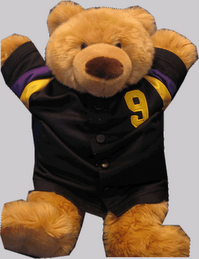
Okay, that was a long gap without a blog entry from your favorite Rochester Public Library Reference Blog. What has Ripple the bear been up to since this past June (has it been that long?!? - yes, it has). Well, hibernation hits different bears in different ways. And now we're back! It's not Halloween yet, so that's not so terrible.
And it's been a busy summer. We've added several adult internet terminals on the second floor. We now have stations A-O (or A, B, C, D, E, F, G, H, I, J, K, L, M, N and O for those who like to see it all in virtual print), and an express terminal. But wait, as the Infomercialians say, there's more. And that more is station A which has not only a scanner, not only Word 2003, not only Excel 2003, but the entire Office 2003 Suite installed on it for your processing, spreadsheeting, and officing pleasure. You do have to sign up for it specifically - so please do so at the sign up terminal (or directly on the machine if no one is on it).
Which brings up another one of our somewhat recent changes: direct reservations on the adult internet terminals. We have set up the internet stations so that you can log directly on to a free internet terminal by walking up to it and signing on with your card and PIN number.
Admittedly this has caused a touch of confusion, at least initially. If someone goes to the sign on terminal and place a reservation a nanosecond before you start clicking on the screen, they will get that computer first. So, a tip for you if you're walking up to the terminal to sign on directly, start typing right away. That should take your computer out of immediate danger of being pulled out from under you. Sorry, "sign on at the terminal people". You can type and scan fast, too, if you want.
One reason that we made this change is that some patrons didn't care for the fact that they couldn't choose the location of their computer. With direct signing on, you can choose any open terminal.
There were some fears that allowing direct signing on would start a "Running of the Bulls" for internet computers when we first opened in the morning (you know who you are), but this has clearly not happened (you know who you aren't).
Anyway, that's all from Ripple's den at this point. Look forward to more Bear blogging as we power back into Web 2.0 territory. More pictures (which is to say any) next time. Promise.
And it's been a busy summer. We've added several adult internet terminals on the second floor. We now have stations A-O (or A, B, C, D, E, F, G, H, I, J, K, L, M, N and O for those who like to see it all in virtual print), and an express terminal. But wait, as the Infomercialians say, there's more. And that more is station A which has not only a scanner, not only Word 2003, not only Excel 2003, but the entire Office 2003 Suite installed on it for your processing, spreadsheeting, and officing pleasure. You do have to sign up for it specifically - so please do so at the sign up terminal (or directly on the machine if no one is on it).
Which brings up another one of our somewhat recent changes: direct reservations on the adult internet terminals. We have set up the internet stations so that you can log directly on to a free internet terminal by walking up to it and signing on with your card and PIN number.
Admittedly this has caused a touch of confusion, at least initially. If someone goes to the sign on terminal and place a reservation a nanosecond before you start clicking on the screen, they will get that computer first. So, a tip for you if you're walking up to the terminal to sign on directly, start typing right away. That should take your computer out of immediate danger of being pulled out from under you. Sorry, "sign on at the terminal people". You can type and scan fast, too, if you want.
One reason that we made this change is that some patrons didn't care for the fact that they couldn't choose the location of their computer. With direct signing on, you can choose any open terminal.
There were some fears that allowing direct signing on would start a "Running of the Bulls" for internet computers when we first opened in the morning (you know who you are), but this has clearly not happened (you know who you aren't).
Anyway, that's all from Ripple's den at this point. Look forward to more Bear blogging as we power back into Web 2.0 territory. More pictures (which is to say any) next time. Promise.
Thursday, May 22, 2008
Next Reads and Author of the Month
 While your first thought when you hear the phrase "two great tastes that taste great together" may be the combination of peanut butter and chocolate, at the library we have the literary equivalent of a Reese's Peanut Butter Cup - NextReads and Author of the Month.
You read. In addition to this lovely blog, you read actual, honest-to-goodness books. And sometimes you run out of ideas of what to read next. That's where NextReads and Author of the Month come in.
Now you could wander into the library with a blindfold on (not recommended, or even suggested) and randomly pick a book from our shelves. You might like it, you might not (JavaScript for Dummies may or may not be compelling. Okay, it's not compelling). But you're better off getting some informed choices coming your direction. Informed? How would you do that? Well in this age of e-mail and the internet, we've got tools for you. Great tools.
First up, Next Reads. How would you like to have us e-mail you some monthly suggestions of new and classic books based on your reading preferences? That sounds a bit boring, but let me re-phrase: You pick the genre, we'll deliver you the choices. For example, ever since you read David McCullough's Truman biography, you've realized that biographies are really, really interesting. You can pick "History and Current Events" and "Biography and Memoir", give us your favorite email address, and BINGO, you'll get some super-spiffy-keen non-boring book suggestions (with pictures if you read the email in HTML). Once you get the list of books, you have links to the library's catalog so you can reserve them immediately. Cool, huh?
Head to the NextReads homepage to sign up. Go ahead, we'll wait for you.
First up, Next Reads. How would you like to have us e-mail you some monthly suggestions of new and classic books based on your reading preferences? That sounds a bit boring, but let me re-phrase: You pick the genre, we'll deliver you the choices. For example, ever since you read David McCullough's Truman biography, you've realized that biographies are really, really interesting. You can pick "History and Current Events" and "Biography and Memoir", give us your favorite email address, and BINGO, you'll get some super-spiffy-keen non-boring book suggestions (with pictures if you read the email in HTML). Once you get the list of books, you have links to the library's catalog so you can reserve them immediately. Cool, huh?
Head to the NextReads homepage to sign up. Go ahead, we'll wait for you.
Too high tech for you or you don't care much for the email thing? No problem. We've got another trick up our sleeve for you. Head to the reference homepage and check out the right colu mn. But you say to yourself, "The reference homepage doesn't have a right column". Well, now it does. And it's sole occupant is the brand new "Author of the Month" feature.
Every month a trained Rochester librarian will hand-select a worthy author and insert he or she into the aforementioned right column for your perusing pleasure. This month features renowned religious scholar Karen Armstrong. To sweeten the deal, we'll even make the pictures in the column linkable to our catalog so you can go right to that author's books in our collection. All for the same price as we charge for our other library services (free).
Let us know what you think about our new web features!
mn. But you say to yourself, "The reference homepage doesn't have a right column". Well, now it does. And it's sole occupant is the brand new "Author of the Month" feature.Every month a trained Rochester librarian will hand-select a worthy author and insert he or she into the aforementioned right column for your perusing pleasure. This month features renowned religious scholar Karen Armstrong. To sweeten the deal, we'll even make the pictures in the column linkable to our catalog so you can go right to that author's books in our collection. All for the same price as we charge for our other library services (free).
Let us know what you think about our new web features!
Monday, April 28, 2008
Finding your Past on our New Genealogy Page
 Those of you who are looking for your ancestors at the library (not literally, of course) have one more arrow in your quiver with the Rochester Public Library's new Genealogy & Local History Resources page. Or perhaps it would be more correct to say that we have now organized all your arrows into the same quiver on our Genealogy page. This page give you a quick rundown of the library's online resources (staggering amounts of information stored in computer databases for your comfort and convenience) , paper resources (those book and pamphlet things), allows you to search the library's catalog under some popular subject headings and more.
Right smack in the middle of the page are links to our fabulous online databases. What is an online database, you ask? (Well, you probably know, but I'm going to pretend for the moment that you don't.) Harnessing the power of the 21st Century to find records from before the 21st Century (sometimes well before the 21st Century), you can search through records from the Census, Immigration records, Military records, local history books and more without having to look at every single page of every single book (and there are lots of books). The five resources on the Genealogy page include Ancestry, HeritageQuest, New England Ancestors, the Post-Bulletin Archives, and the Olmsted History Center. If you were on the playground picking genealogy databases for a basketball team, these are the five databases you would want on your team.
One valuable resource that sometimes gets overlooked in libraries is the venerable "vertical file". Before we go too crazy with the alliteration, let's translate "vertical file" into "pamphlet file" (i.e. all of those file cabinets behind the adult internet terminals on the second floor with lots of pamphlets in them). They are spectacularly unglamourous file folders jam-packed with useful, often historical information. You can find maps, old programs for historical happenings, photographs, and all sorts of evidence that we existed long before the advent of the internet. The key to finding information in those files is knowing what subject headings to look under. That's where the lists under the "Local History Materials" come in handy. Think of the lists as treasure maps that will lead you to historical treasure. (Please note that no actual treasure - at least of the golden or jeweled variety - rests in our pamphlet file cabinets.) Some lists will also mention some other useful resources in the library.
Another handy feature of the Genealogy page is that you can search our catalog by Geographical Region or look through a specific type of Genealogy Guides with the click of a mouse button. We also have links for the list of Genealogy periodicals (journals and magazines in non-library language). And to round out the resources, there are links that have instructions for requesting an obituary form Rochester newspapers or interlibrary loan of materials. Almost hidden on the bottom of the page is a list of recommended internet sites for both Minnesota and non-Minnesota (i.e. U. S. and international) genealogical resources.
Whew, that's a lot of resources at your fingertips and all without a single exhumation!
Monday, March 31, 2008
RPL @ PLA (Public Library Association) 2008
 Rochester sent a large contingent of library staff to attend this year's Public Library Association meeting held at the Minneapolis Convention Center. This four-day (or five-day if you came for pre-conference) event showcased some of the best and brightest that the library world has to offer.
In addition to the hundreds of vendors on the convention center floor (selling more than we could possibly ever buy, but would like to), there were classes held on seemingly every library topic under the sun (except the card catalog - some of you are experiencing a sigh, others a sigh of relief).
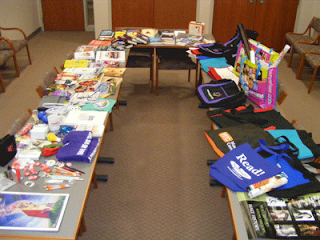 Representatives from Reference, Administration, Circulation, Reader Services, Technical Services and Children's all took in various sessions to learn how to be better public libraries. And collected a veritable smorgasbord of bags, books, pens and other giveaways for prizes, thank you gifts and whatnot.
During the opening ceremony, several different people (visiting from other states) kept on remarking about how cold it was here. Every single one seemed to. Repeatedly. Okay: One, the temperature is above freezing and it's just lovely. Two, we get it. It is colder here than where you're from. We really get it. But we're not holding the conference in a tent outside or making you go out to hunt your own food in the arctic tundra, so get over it. Thus endeth the rant.
Cold weather aside, the folks at the conference were very friendly, and had lots of great ideas for us to mull over back in Rochester. Changes in the library world have been and continue to be sweeping, and RPL does not want to be caught resting on its laurels. Many of the cutting edge ideas that our colleagues presented at PLA were already being implemented (or are in the planning stages) including "roving" reference service, better signage, downloadable audio, video, and music, and much more. You'll be seeing more in the weeks and months to come
Wednesday, March 05, 2008
AskMN 24/7 Reference is coming!
What is "AskMN" you might ask? If we said that it was a statewide virtual reference initiative, would you stop reading because that's some mighty boring jargon? In that case (for those who are still reading), let's say that it's reference assistance from a real librarian 24/7 (twenty-four hours a day/seven days a week - not the much awaited Kiefer Sutherland show "24", Season 7). If you can type it, we will answer.
Rochester is getting in at the ground floor of the AskMN project which involves several libraries across the state providing reference service all day and all of the night (and a small royalty check to the Kinks for using that phrase).
Great, you say. When can I use this service? The best answer is soon. We are running vigorous clinical and psychological trials as we speak to work out the bugs (and learn the software) and we hope to launch sometime this spring. As soon as we're live, we'll blog about it and you can start sending us your questions.
Speaking of questions, you might be wondering how Rochester Public Library (or the other MN libraries in the group) are going to staff reference 24 hours a day. Did some of the RPL staff move to Sydney, Australia to cover the overnight hours ? (Not a bad idea, but incorrect.) No, your beloved RPL staff (and also beloved, but more distant MN libraries staff) will only be covering some of the time during our normal operating hours. If you get up at 3:00AM and need to know something, you may be talking to an expert librarian Down Under, but you will be talking to a librarian.
Exciting? Yes. Keep posted to find out more.
Rochester is getting in at the ground floor of the AskMN project which involves several libraries across the state providing reference service all day and all of the night (and a small royalty check to the Kinks for using that phrase).
Great, you say. When can I use this service? The best answer is soon. We are running vigorous clinical and psychological trials as we speak to work out the bugs (and learn the software) and we hope to launch sometime this spring. As soon as we're live, we'll blog about it and you can start sending us your questions.
Speaking of questions, you might be wondering how Rochester Public Library (or the other MN libraries in the group) are going to staff reference 24 hours a day. Did some of the RPL staff move to Sydney, Australia to cover the overnight hours ? (Not a bad idea, but incorrect.) No, your beloved RPL staff (and also beloved, but more distant MN libraries staff) will only be covering some of the time during our normal operating hours. If you get up at 3:00AM and need to know something, you may be talking to an expert librarian Down Under, but you will be talking to a librarian.
Exciting? Yes. Keep posted to find out more.
Monday, January 28, 2008
RPL's Current Crop of Top Tunes of 2007
 Remember when Minnesota Public Radio wasn't the hippest place for the young kids of today to listen to music? No disrespect to musicians on A Prairie Home Companion, the classical music service, the Jazz Image (okay, Leigh Kammen tended to go on a bit, but he's retired now), or other fine standard-bearing MPR programs, but come on.
That all changed in a Public Radio Seismic Shift better known as the introduction of alternative-music-only station The Current.
So why are we promoting MPR on the RPL blog? Good question. Or perhaps the better question is: Got Current artists? The answer is Yes.
So why are we promoting MPR on the RPL blog? Good question. Or perhaps the better question is: Got Current artists? The answer is Yes.
Many of you may already know that The Current has published their list of the top 89 albums of 2007 and we're happy to report that many of the titles on the list are owned by our library. Need to get  your fix of Wilco, Spoon, the White Stripes, and more? We Got 'em.
your fix of Wilco, Spoon, the White Stripes, and more? We Got 'em.You can search for music CDs in the library's online catalog by album title (say, Icky Thump) or performing artist (use "author")(say, White Stripes). Music CDs can be checked out for 14 days (7 days if there are reserves waiting).
If you don't see your favorite album or artist represented in our library collection and think other library users would be interested in it too, you can make a recommendation for purchase by entering your library card number and pin number at this link (you do need to have library card in good standing to make recommendations). You can recommend 12 titles per 12-month period. Any comments about your favorite CDs of 2007? Feel free to post comments below!
Friday, January 18, 2008
Notes from the Big Blue NonFiction Wall: January
It's so very, very cold again and a great time to make sure that you have some very, very good books to keep your mind engaged while we wait for the Earth to get a move on into that warm, sunny Spring-ward tilt that we love so much. Time to take a brief tour of the newest of the new non-fiction gracing the mighty Big Blue NonFiction wall on the second floor of the Rochester Public Library.
Speaking of the Earth, let's start with something a little Cosmic. America In Space: Nasa's First Fifty Years (with a forward by Neil Armstrong - the astronaut, not the biker dude who used to date Sheryl Crow) is a spectacular coffee table book that deals with everything N ASA from the pre-Explorer days to the Moon to the Space Shuttle and beyond. There are some truly spectacular images of Earth, spacecraft, and the men and women who boldly went where most of us are unlikely to go. There's even a picture of Richard Nixon laughing (page 195, if you don't believe me)! Whether you remember those heady times of the Space Race with the Soviet Union or you're saying to yourself "What was this 'Soviet Union'?", this book will amaze and delight.
 ASA from the pre-Explorer days to the Moon to the Space Shuttle and beyond. There are some truly spectacular images of Earth, spacecraft, and the men and women who boldly went where most of us are unlikely to go. There's even a picture of Richard Nixon laughing (page 195, if you don't believe me)! Whether you remember those heady times of the Space Race with the Soviet Union or you're saying to yourself "What was this 'Soviet Union'?", this book will amaze and delight.
Switching gears from the Heavens to the not-so-funny, but sometimes-funny pages comes the book Art S piegelman: Conversations edited by Joseph Witek. For those who may not be in the know, Mr. Spiegelman is the acclaimed artist/writer of the graphic novel Maus: A Survivors Tale which tells the story of his father's experience in the Holocaust and won a Special Pulitzer Prize in 1992. It was one of the first works that showed that the medium of comics could be used to tell serious stories and made Spiegelman one of the famous literary cartoonists in the world (admittedly, a small group). This new book is a collection of conversations with Speigelman (hence the catch & accurate title of the book) spans thirty years and serves as a primer on this history and development of comics as a serious art form. Spiegelman is a very smart, funny and candid artist and it is interesting to catch his words at so many different junctures of his career in one place.
 piegelman: Conversations edited by Joseph Witek. For those who may not be in the know, Mr. Spiegelman is the acclaimed artist/writer of the graphic novel Maus: A Survivors Tale which tells the story of his father's experience in the Holocaust and won a Special Pulitzer Prize in 1992. It was one of the first works that showed that the medium of comics could be used to tell serious stories and made Spiegelman one of the famous literary cartoonists in the world (admittedly, a small group). This new book is a collection of conversations with Speigelman (hence the catch & accurate title of the book) spans thirty years and serves as a primer on this history and development of comics as a serious art form. Spiegelman is a very smart, funny and candid artist and it is interesting to catch his words at so many different junctures of his career in one place.
For those of you who thought secret Presidential taping was the sole purview of one Richard Milhous Nixon, think again. LBJ was a secret taper par excellence, and some recently released  transcripts of his 1964 recordings prove it. Get an insider's view through this amazing collection of phone conversation collected in The Presidential Recordings, Lyndon B. Johnson. Don't worry, once you finish the first one, there are still two other new volumes that we've recently received at the library. Editors David Schreve, Robert David Johnson put the conversations in historical context and give quite the insight into one of this country's more turbulent decades. Secret taping done right.
 transcripts of his 1964 recordings prove it. Get an insider's view through this amazing collection of phone conversation collected in The Presidential Recordings, Lyndon B. Johnson. Don't worry, once you finish the first one, there are still two other new volumes that we've recently received at the library. Editors David Schreve, Robert David Johnson put the conversations in historical context and give quite the insight into one of this country's more turbulent decades. Secret taping done right.
And finally, the book we've all been waiting to have written ever since cavemen started acting  rudely at the Dawn of Time (see the beginning of 2001: A Space Odyssey for details) : Look, Speak, & Behave For Men by Jamie Yasko-Mangum. This book contains "expert advice on Image, Etiquette, and Effective Communication for the Professional" in a mere 212 pages. If effective, it could be Pulitzer time for Ms. Yasko-Mangum. Bringing together the four elements that make a man a man (Positive Self-Esteem, Polished Appearance, Speaking Intelligently, and Behaving With Pride), this book gives tips for the modern professional man (although not much of it seems to apply to professional wrestlers) in a concise, readable little book. A book hardly bigger than a PDA (and potentially more valuable) could be sitting there for you if you visit the Big Blue NonFiction wall in time. Also available (but probably less necessary) Look, Speak, & Behave For Women.
 rudely at the Dawn of Time (see the beginning of 2001: A Space Odyssey for details) : Look, Speak, & Behave For Men by Jamie Yasko-Mangum. This book contains "expert advice on Image, Etiquette, and Effective Communication for the Professional" in a mere 212 pages. If effective, it could be Pulitzer time for Ms. Yasko-Mangum. Bringing together the four elements that make a man a man (Positive Self-Esteem, Polished Appearance, Speaking Intelligently, and Behaving With Pride), this book gives tips for the modern professional man (although not much of it seems to apply to professional wrestlers) in a concise, readable little book. A book hardly bigger than a PDA (and potentially more valuable) could be sitting there for you if you visit the Big Blue NonFiction wall in time. Also available (but probably less necessary) Look, Speak, & Behave For Women.
Until next month, remember to visit the Big Blue NonFiction wall because you'll never know what you might find.
Wednesday, January 09, 2008
Directory Assistance or Ancestry in the City
 When a singer has an incredibly good voice, people will sometimes say that they could "sing the phone book" and it would be good. The underlying thought is that phone books are an inherently boring read and only Ol' Blue Eyes (or insert your crooner-of-choice here) could make it interesting.
Poppycock! Even if you are cursed with something less than a Golden Throat, be assured that you could still sing the words from our collection of Rochester City Directories and put a song in the heart of local historians.
Lets talk about phone books for a minute. Okay, when they're not new any more and start piling up in your garage, they aren't all that exciting. But like John Travolta, if they hang around long enough through a period of pointless direct-to-video offerings, the fickle public once again embraces their charms.
Enter Rochester City Directories. We've got them here at the library going back as far as 1911. What good are they? Well, first off, a City Directory is a little bit more than a phone book. Way back when, in addition to your phone number (and some of the earliest ones aren't particularly chock full of phone numbers as the "telephone technology" hadn't quite caught on yet), City Directories listed the people who lived in the town and also listed their occupations (even if your occupation was "high school student"). If you're interested in local history or family genealogy, your Spider Sense should be fully a-tingle. These books are treasure troves of historical information!
Want to know who lived in your house in years gone by? You can look up any property by its street address and find out who owned (and quite possibly who lived) in it. You can also see what the businesses of the day were.
You want a list of farmers in Olmsted County in 1923 (and, really, who doesn't?), check out the directory. You can see which churches, businesses, and politicians were around at that time.
Lots of this information is not available from any other source (sorry Google, you don't have EVERYTHING yet). Another reason to visit your good ol' Rochester Public Library. Because of their historical significance (and their irreplaceable nature), we do keep our City Directories archived in the Magazine Room (far back left corner of the 2nd floor as you're coming up the stairs or elevator). You can read them while you're here (and we have one of those photocopy machines if you find something good.) The upside is that they are never checked out, so they will be here when you visit.
A whole Historical Rochester awaits!

Tuesday, December 18, 2007
A Periodic check of Library Periodicals
 With all of these recent blog entries spent talking about our online resources, the RPL Reference Blog mailbag has been filled with comments about the actual paper resources in the library. The ones you can read without a computer.
One reader asks: What about the magazines? I hear you have over 600 magazines and newspapers, can that possibly be true? And if so, can you read them in the warm, glorious sunshine on the second floor and take in a beautiful view of the city at the same time at no extra cost?
Yes, my friend, to all of your questions. Looking out at the six vast pillars of magazine spin racks, the mighty plexiglass newspaper stands (pictured above or beside depending on your browser resolution) and the scores of magazines scattered in the appropriate sections on the first floor and on the bookmobile we have over 600 periodicals (which is a boring library word for "something that is published on a regular basis", i.e. newspapers and magazines).
Now you're thinking to yourself: I can't possibly read that many of your "periodicals" every month. No one is asking you to. But if you want to, they're there for you.
By the same token, just because you live in the country doesn't mean that you'll want to read every issue of Country Journal, Country Living, Country's Best Log Homes (hello, Mr. Lincoln), but we have them here. Also, city-dwellers, be aware that you are also free to look at these periodicals without fear of library staff checking to see if you do, indeed, live in the country. Ah, freedom is wonderful!
We've got magazines on Hobbies (Coin World, Doll Reader, Model Airplane News, Rubber Stamper, Wood), magazines on Fashion (Brides, Cosmopolitan, Elle, Glamour, Seventeen, Vanity Fair), magazines on Art (American Artist, Art & Antiques, Ceramics Monthly, Dance Magazine), and jillions* more.
In addition to two copies of our local newspaper, the Rochester Post-Bulletin, we get several newspapers including the Chicago Tribune, the Des Moines Register, Investors Business Daily, Minneapolis StarTribune, The New York Times, The Wall Street Journal, and more. That's an awful lot of crossword puzzles under one roof (please don't fill in the crossword puzzles, at least not in pen).
But wait, there's more. Along with our American 'periodicals', we have several foreign language newspapers and magazines including Paris Match (French), Haboon (Somali), Zhuan Ji Wen Xue (Chinese), and Bunte (German).
You can check the listings of magazines the library owns by general category by clicking on the type:
Whatever kind of periodical you crave, you're bound to find something of interest here. Grab a cup of coffee (with a covered lid, of course, for approved library use) and set up in the magazine area on the second floor and peruse your favorite newspapers and magazines in your favorite library.
* in this case one jillion = about a hundred (this note added to keep our lawyers happy)
Saturday, November 24, 2007
The Crafty, Ingenious World of Subscription Databases, Part Six: EBSCO MegaFILE

After the film "Supersize Me", a lot of people may be thinking twice about ordering up to the largest item on the menu, but you may want to reconsider that with the EBSCO MegaFILE. The MegaFILE is one big heaping helping of publication gold that contains no unhealthy trans fats (when used properly).
What is the MegaFILE? Admittedly, the name is a bit vague, but if you're doing research for a school paper, it may be your very best friend (sorry, Fido, back to you when the grades have been posted). If you look up "teachers" on Wikipedia, you will see them defined as "those people who don't accept Wikipedia as a source on school papers." MegaFILE to the rescue.
What is the MegaFILE? Admittedly, the name is a bit vague, but if you're doing research for a school paper, it may be your very best friend (sorry, Fido, back to you when the grades have been posted). If you look up "teachers" on Wikipedia, you will see them defined as "those people who don't accept Wikipedia as a source on school papers." MegaFILE to the rescue.
The MegaFILE gives you access to thousands of newspaper, magazine, and academic journal articles and allows you to read (and print) them from your computer.
All of the resources available in the treasure trove that is the MegaFILE are from paper publications that exist in real space, not just in cyberspace. In many cases, you can even print out either the full text of these articles (HTML Full text) or even a reproduction of the actual pages from the publication (PDF). Just make sure that the default "full text" box is checked and you'll be able read the articles.
Want to e-mail the articles to yourself? Can do.
Hate writing official citations for your articles? (And, really, who doesn't?) Let the MegaFILE do it for you. Once you have selected your article, and are set to e-mail it to yourself, go to the right side of the page and select "Citation Format" and select APA, ALA, Chicago or MLA formats and the citation will be delivered to you in email format.
Need to limit your search to scholarly journals? How about magazine articles only? Check and check.
Need to find an article in a particular publication? You can search within a particular publication (or look to see what coverage the library has for it) in a simple publication search.
Can you select a topic and be alerted in your RSS reader when a new article is printed on you topic? Well, we would hardly ask that question if the answer was anything but a huge affirmative, would we?
Can you access this database at three in the morning the night before your paper is due? We're not advising you to wait that long, but you can do it. You can access MegaFILE from any internet connection as long as you have a Rochester Public Library card in good standing (i.e. keeping your overdue fees under $10.00 and making sure to keep your user privilege current).
Probably the biggest drawback to the MegaFILE, is that it cannot write your paper for you. Perhaps in the next update.
Friday, November 02, 2007
November New Non-Fiction Notes
Fall (which has been beautiful and amazingly temperate this year) will quickly be changing to that other season (the one with all the snow), and that means it's time for a quick slice of new non-fiction books for indoor reading at your RPL reference blog.
Let's start with some of that jazz: John Coltrane jazz to be specific. The new book Colt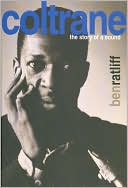 rane - the story of a sound by Ben Ratliff follows the career and art of legendary jazz saxophonist John Coltrane from his beginnings with Miles Davis in the 1950's to his more, shall we say, "experimental" recordings up to the time of his death. Hold on though, that's just the first half. The second half talks about the influence of Coltrane as a musical and spiritual figure in popular (and sometimes not-as-popular-as-it-should-be-because-of-the-word-"jazz") culture. Stop down and pick up some Coltrane CDs downstairs, too, and they will certainly become some of your favorite things.
rane - the story of a sound by Ben Ratliff follows the career and art of legendary jazz saxophonist John Coltrane from his beginnings with Miles Davis in the 1950's to his more, shall we say, "experimental" recordings up to the time of his death. Hold on though, that's just the first half. The second half talks about the influence of Coltrane as a musical and spiritual figure in popular (and sometimes not-as-popular-as-it-should-be-because-of-the-word-"jazz") culture. Stop down and pick up some Coltrane CDs downstairs, too, and they will certainly become some of your favorite things.And now to the funnier side of life, illustrated (in great 1980's detail), in the book Spy - The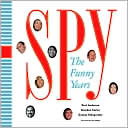 Funny Years by Kurt Andersen, Graydon Carter, and George Kalogerakis - a look at the great days of the late-lamented humor magazine. Think of the Daily Show or the Colbert Report in glossy magazine format (or, perhaps more accurately, think of the books that those shows have produced). And really, when you get down to it, is there any decade more ripe for making fun of than the eighties? This book will make you laugh more than Bill Cosby trying to tell you that "New Coke" is better than "Classic Coke". According to the back cover blurb Donald Trump describes Spy as "a piece of garbage". And he ought to know. Enjoy!
Funny Years by Kurt Andersen, Graydon Carter, and George Kalogerakis - a look at the great days of the late-lamented humor magazine. Think of the Daily Show or the Colbert Report in glossy magazine format (or, perhaps more accurately, think of the books that those shows have produced). And really, when you get down to it, is there any decade more ripe for making fun of than the eighties? This book will make you laugh more than Bill Cosby trying to tell you that "New Coke" is better than "Classic Coke". According to the back cover blurb Donald Trump describes Spy as "a piece of garbage". And he ought to know. Enjoy! While it would be great to spend the entire afternoon telling you about every single one of the new non-fiction titles on the Great Blue Nonfiction Wall, we're just going to mention one  more, The Other Side of War: Women's Stories of Hope and Survival by Zainab Salbi which "takes readers into the heart of Afghanistan, Bosnia, Columbia, Democratic Republic of the Congo, Rwanda, and Sudan to hear the stories of women who daily reclaim the lives of their families and communities from the ashes of conflict." A truly moving book well worth reading.
more, The Other Side of War: Women's Stories of Hope and Survival by Zainab Salbi which "takes readers into the heart of Afghanistan, Bosnia, Columbia, Democratic Republic of the Congo, Rwanda, and Sudan to hear the stories of women who daily reclaim the lives of their families and communities from the ashes of conflict." A truly moving book well worth reading.For these new titles and more, you owe it to yourself to visit the Great Blue Nonfiction Wall before you need to get out the shovel.
Sunday, October 07, 2007
The More-Than-Moderately Swell-egant World of Subscription Databases, Part Five: Auto Repair Reference Center
 When your car breaks down and you don't happen to have that fifteen pound repair manual in your trunk and the library just checked out the last copy of the very book you needed, you're out of luck, right?
Perhaps, in the pre-database age, but not anymore. Now it's Auto Repair Reference Center to the rescue. It's even less expensive than AAA (although you will pay for your own towing).
This resource for the mechanically inclined allows you to search by year, manufacturer, and model (and even by engine type - which is more than some of us will ever figure out about our cars) to get repair guides - many of which even have pictures (or "diagrams" for those aforementioned mechanically inclined).
Once you find the car you're looking for, you have a list of detailed repair procedures, to help you with repair, replacement or just general upkeep of your car.
Thousands of cars and trucks are at your electronic fingertips, and you can even print out the pages whether you're here at the library or logged in from home.
The repair information is also searchable by keyword - which translates to you can put in whatever part of the car you want information about and it will search through the entire contents of the repair information and give you only the bits that relate to your search.
And the best part - there are no dark, oily fingerprints on all the good pages.
Monday, September 17, 2007
Spectacular World of Subscription Databases, Part Four: Groliers Encyclopedia Online (a.k.a. Grolier Online Passport)
And you thought that if an encyclopedia salesperson didn't knock on your door you were done with encyclopedias for the rest of your days. Well, no. Instead of heading downstairs to that mold-infested, semi-complete set of 1964 encyclopedias* to get the information you need, you can log onto the Grolier Online Passport (speedy to use, even in this age of security precautions) and get not only encyclopedia information, not only atlas information, but also a dictionary that talks to you (okay, it pronounces the word, b ut it's all good!)
First the search box on the Grolier Online Passport page makes it easy, quick, and quite frankly a bit magical to search all these fine resources at once.
Let's take a closer look at what's in the magic box. For starters you get access to five different encyclopedic resources: Encyclopedia Americana, Grolier Multimedia Encyclopedia, The New Book of Knowledge, Lands and Peoples and America the Beautiful. But wait, there's more....
On the dictionary front, you get five different American Heritage dictionaries: Dictionary of the English Language, Student Dictionary, Children's Dictionary, Spanish to English Dictionary and (just to be fair) the English to Spanish Dictionary. That's a lot of dictionary-ing (a word not in any of these dictionaries, I checked.)
But what about an online atlas? Glad you asked. The atlas features geopolitical maps (of course), thematic maps (on such topics as agriculture, population, plate tectonics, religion and more), and the always handy global distances (which allows you to find the distance between different cities in the world.) Of course there's more (like the exploration routes of the circumnavigators, but that's just too much for one blog entry.)
What else do you want, lesson plans for educators? Got 'em. Featured news stories and an international news desk. But of course.
This is a great resource for K-12 students starting to scratch the surface (and sometimes even get beneath the surface) of their paper topics. If you are of a certain age, you can jump right to the Grolier Online Kids page and search the resource in another great, age-appropriate interface. Kids, just think about all this authoritative information without the shaky URLs from your unverifiable sources on the Internet. It's so book-like (yet not-so-book-like), you'll love it.
Set your course for adventure with the Grolier Online Passport!
*Incidentally, even though your heart is in the right place, please don't donate this encyclopedia to the library, thank you.
 ut it's all good!)
First the search box on the Grolier Online Passport page makes it easy, quick, and quite frankly a bit magical to search all these fine resources at once.
Let's take a closer look at what's in the magic box. For starters you get access to five different encyclopedic resources: Encyclopedia Americana, Grolier Multimedia Encyclopedia, The New Book of Knowledge, Lands and Peoples and America the Beautiful. But wait, there's more....
On the dictionary front, you get five different American Heritage dictionaries: Dictionary of the English Language, Student Dictionary, Children's Dictionary, Spanish to English Dictionary and (just to be fair) the English to Spanish Dictionary. That's a lot of dictionary-ing (a word not in any of these dictionaries, I checked.)
But what about an online atlas? Glad you asked. The atlas features geopolitical maps (of course), thematic maps (on such topics as agriculture, population, plate tectonics, religion and more), and the always handy global distances (which allows you to find the distance between different cities in the world.) Of course there's more (like the exploration routes of the circumnavigators, but that's just too much for one blog entry.)
What else do you want, lesson plans for educators? Got 'em. Featured news stories and an international news desk. But of course.
This is a great resource for K-12 students starting to scratch the surface (and sometimes even get beneath the surface) of their paper topics. If you are of a certain age, you can jump right to the Grolier Online Kids page and search the resource in another great, age-appropriate interface. Kids, just think about all this authoritative information without the shaky URLs from your unverifiable sources on the Internet. It's so book-like (yet not-so-book-like), you'll love it.
Set your course for adventure with the Grolier Online Passport!
*Incidentally, even though your heart is in the right place, please don't donate this encyclopedia to the library, thank you.
Thursday, August 23, 2007
The Scrumpdillyious World of Online Databases, Part Three: Foundation Center Directory Online
 Isaac Asimov fans, calm down - way down. This has nothing to do with that Foundation. Breathe. Breathe. Okay, we can go on.
The Rochester Public Library is a "Cooperating Collection" of the Foundation Center. What does that mean for you? It means that you, the aspiring do-gooder can find ways to get hooked up with grantmakers who share your do-goodingness and have set up grants to help fund all that good.
The online version of the Foundation Directory allows you to search for grantmakers by name, state, city, fields of interest, types of support, geographical focus, officers/trustees/donors or by type of grantmaker. Or any combination thereof. It's easier than it sounds.
In a nutshell, the Foundation Directory allows you to comb through the vast sea of grantmakers and find one (or more) that would suit your goal and get contact information to apply for those funds.
You can also do extensive searches within a particular company, for a particular grant, or search the entire text of IRS 990 forms for grantmaking organizations (if you don't happen to be washing your hair that night).
Now with something this wonderful, you would think you'd have to be here in the library to use it. No, my friend, this is another one you can use online from home in your bunny slippers with a hot cup of joe and the weather outside being frightful.
Stay tuned for Part 4.....
Thursday, August 09, 2007
Fantastical World of Subscription Databases, Part Two: Books In Print
 What do I want to read next? Library readers have been asking that since the days of scrolls in the Alexandrian library. And while the launch of "Scrolls in Print" never made the history books as a particularly great innovation, Books in Print (BIP) deserves a place in the Readers' Hall of Fame.
If addition to the obvious (letting you know which books are in print), BIP lets you browse fiction by subject, award, or author. You can even type in a year and get the best sellers for that year.
BIP can give you information about particular books such as whether they are available in audio format(s), listings of when a book has been mentioned in the media, author bios and more.
The special children's area allows you to search for books by favorite series', picture books, recurring characters in children's works, and children's award winners.
One of the funkiest features of BIP is the Fiction Connection's "Aquabrowser". For those folks who like to "think visual", the Aquabrower creates a map of topics once you pick a category such as genre, setting, character, location, and timeframe. The map looks a little like a cluster of cocktail toothpicks, each with a different keyword on it. If you click on a toothpick keyword, your map will re-form and gives you a different set of related keywords. Meanwhile, on the other side of your browser window, you get a list of books related to your topic and if you find one you like, you can hit the "find similar" button and get even more books that are similar to the one you already love.
Lastly, (okay not lastly, but we can't get into every detail in a short blog entry), you can set up a "My Favorites" account that will allow you to save lists of your favorite books, build customized searches, and get alerts when books that meet your criteria are released.
See you next time for another one of our Merely Marvelous databases......
Wednesday, August 01, 2007
The Magical World of Subscription Databases, Part One: Reference USA
Okay, this is the first part of a loooooooooooong series talking about our wonderful online resources. How wonderful are they? Let me count the ways. Or better yet, let's just get started with one....
Reference USA might not have the snappiest name in the known universe - you can hardly argue with that - but it is a really great resource.
What can you do with Ref USA (as the cool kids call it)? What can't you do with it? You want to look up residential addresses all over the country? Done. You've only got a phone number and you want to see what person or business it belongs to, you can look that up, too. You want to know how many employees a company has, what the executive names and titles are, the type of business they do, what their sales volume is, what year they were established, generate a list of businesses of a certain type in a certain region, you've got that and much, much more.
This is also a really great tool for people looking to start a new business in an area (scout out the competition, see if there is a dire need for your company in a particular area), marketers (target companies that would be interested in your particular type of widget), and job seekers (search locally or nationally to look for the particular types of companies - big, small, particular industries - that you're looking for).
While we don't have time to go into all the functions of Ref USA, suffice to say that you can make all kinds of company searches from the most general (i.e. every ball bearing manufacturer in the USA) to very narrow, pinpoint surgical searches (all ball bearing manufacturers in the metro area of Kalamazoo, Michigan with more than 100 employees, a sales volume of more than $500,000, established since 1988, that own more than 10 computers, and much more.
This is one of the databases that you can access both at the library and online from outside the library as long as you have library card in good standing (and you know who your are).
Tune in next time for The Fantastical World of Subscription Databases part 2: featuring...??? Well, you'll just have to tune in.
Okay, this is the first part of a loooooooooooong series talking about our wonderful online resources. How wonderful are they? Let me count the ways. Or better yet, let's just get started with one....

Reference USA might not have the snappiest name in the known universe - you can hardly argue with that - but it is a really great resource.
What can you do with Ref USA (as the cool kids call it)? What can't you do with it? You want to look up residential addresses all over the country? Done. You've only got a phone number and you want to see what person or business it belongs to, you can look that up, too. You want to know how many employees a company has, what the executive names and titles are, the type of business they do, what their sales volume is, what year they were established, generate a list of businesses of a certain type in a certain region, you've got that and much, much more.
This is also a really great tool for people looking to start a new business in an area (scout out the competition, see if there is a dire need for your company in a particular area), marketers (target companies that would be interested in your particular type of widget), and job seekers (search locally or nationally to look for the particular types of companies - big, small, particular industries - that you're looking for).
While we don't have time to go into all the functions of Ref USA, suffice to say that you can make all kinds of company searches from the most general (i.e. every ball bearing manufacturer in the USA) to very narrow, pinpoint surgical searches (all ball bearing manufacturers in the metro area of Kalamazoo, Michigan with more than 100 employees, a sales volume of more than $500,000, established since 1988, that own more than 10 computers, and much more.
This is one of the databases that you can access both at the library and online from outside the library as long as you have library card in good standing (and you know who your are).
Tune in next time for The Fantastical World of Subscription Databases part 2: featuring...??? Well, you'll just have to tune in.
Thursday, July 26, 2007
The New Lowdown on the Adult Internet Stations
No, you haven't gotten taller, the internet stations have just come down to earth. Over the past few weeks you may have noticed that some of the internet computers on the second floor have been on tables rather than their individual stations. That was their temporary resting place while we took the stations for a quick trip to through the saw to trim them down a notch or two for your comfort and convenience.

Profound? Important? Noteworthy? Well, yes. Quite a few of you have expressed your preference for the handful of lower-down internet terminals that we had before, so we have made them all just as comfy. In addition to being more comfortable, this will make our internet stations more accessible to all.
So those of you who used to bring in oxygen tanks to make breathing at the high altitudes of our internet stations possible can leave the tanks at home and surf easier on the web at the library.
No, you haven't gotten taller, the internet stations have just come down to earth. Over the past few weeks you may have noticed that some of the internet computers on the second floor have been on tables rather than their individual stations. That was their temporary resting place while we took the stations for a quick trip to through the saw to trim them down a notch or two for your comfort and convenience.

Profound? Important? Noteworthy? Well, yes. Quite a few of you have expressed your preference for the handful of lower-down internet terminals that we had before, so we have made them all just as comfy. In addition to being more comfortable, this will make our internet stations more accessible to all.
So those of you who used to bring in oxygen tanks to make breathing at the high altitudes of our internet stations possible can leave the tanks at home and surf easier on the web at the library.
Subscribe to:
Posts (Atom)